
The two are not rivals. A Google Business Profile (GBP) is the free listing that controls how your business appears on Google Maps and Search. The Google Guarantee was a trust badge on paid Local Services Ads, and Google has since folded it into a badge called Google Verified. The profile is the foundation. The paid ads sit on top of it and pull some of their details from it. For most local owners the right order is to build a strong profile and website first, then decide whether pay-per-lead ads fit your margins.
TL;DR
- A Google Business Profile is a no-charge tool for managing how your business shows up on Maps and Search.
- The Google Guarantee belonged to Local Services Ads, which charge you when a customer contacts you. Google announced in August 2025 that Google Verified would replace it, along with the Money Back Guarantee program.
- Local Services Ads draw some listing details from your profile, so a weak profile weakens the ads too.
- Whether paid leads are worth it depends on your category, budget and how fast you answer the phone. A complete profile pays off in every case.
Table of Contents
- Two different tools, two different jobs
- Is Google Guaranteed still a thing?
- How the two fit together
- What each one costs
- What it takes to qualify
- Is the Google Guarantee worth it?
- A sensible order of operations for a Cincinnati business
- Common mistakes owners make
- Where we can help
- Our perspective
- FAQ
- Sources
Two different tools, two different jobs
Owners often search "Google Guarantee vs GBP" expecting to choose one. They do different jobs.
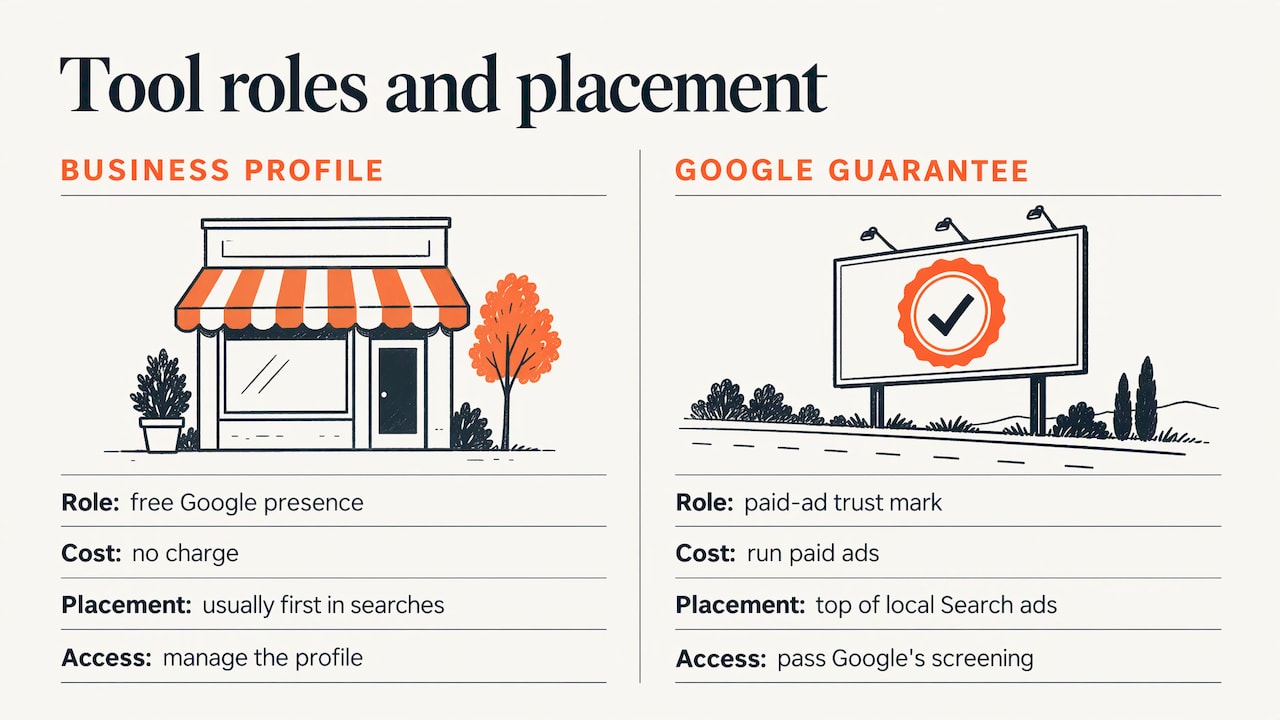
Google Business Profile is your free presence on Google. It can show your hours, website, phone number, location or service area, photos, videos and customer reviews, as described on Google's Business Profile help page. When someone searches "plumber near me" or looks up your name, the profile is usually what they see first.
The Google Guarantee was a screening badge for Local Services Ads (LSAs). These are the ads at the very top of Google Search for location-based service searches. Google described the badge as carrying a money-back guarantee for customers. You do not get the badge by filling out a profile. You get it by passing Google's screening and running paid ads.
So one is a listing you manage for free, and the other was a paid-ad trust mark. Comparing them is like comparing your storefront sign to a billboard with a seal of approval on it.
Is Google Guaranteed still a thing?
The name is on its way out. On August 20, 2025, Google announced that LSA badges would be unified into Google Verified, starting in October of that year. The announcement said Google Verified would replace Google Guaranteed, Google Screened, License Verified by Google and the Money Back Guarantee program. It also said eligible profiles would show details of the checks they passed.
In practical terms:
- The old green "Google Guaranteed" checkmark is being replaced by the Google Verified badge.
- The money-back guarantee program that went with the old badge is part of what Google Verified replaces.
- Many articles, agency pages and forum threads still use the old name. That is why people still search for it.
If you are reading advice from 2019 to 2024, treat the badge names as dated. The underlying idea, that Google checks a business before showing a trust mark, continues.
How the two fit together
Local Services Ads are pay-per-lead ads. According to Google's guide to Local Services Ads, some listing information in those ads comes from your Business Profile, and Google recommends keeping the profile details current for that reason.
The same guide says LSA visibility is influenced by three things:
- Proximity: how close you are to the person searching.
- Reviews: how many you have and how they read.
- Responsiveness: how quickly you answer leads.
Two of those three, reviews and accurate details, are things a well-run profile builds over time. That is the practical link between the tools. Paid placement rewards the same habits that make a free profile rank: a complete listing, steady reviews and fast replies.
What each one costs
| Google Business Profile | Local Services Ads (with the trust badge) | |
|---|---|---|
| Cost to set up | No charge | No charge to set up, but screening is required |
| How you pay | You do not pay Google for the profile | Google charges when a prospect reaches out by phone, message or appointment booking |
| Budget control | Not applicable | You set a weekly budget and a bidding mode |
| Price per lead | Not applicable | Varies by location, job type and bidding mode |
| What you control | Details, photos, posts, replies to reviews | Budget, service areas, hours, responsiveness |
The important point is that lead prices are not fixed. Google says they vary by where you are, what kind of job it is and how you bid, so no national number tells you what a lead costs in Cincinnati for your trade. You find out inside your own account.
The free profile has no per-lead fee, but it is not effortless. Keeping it accurate, answering reviews, adding photos and fixing problems takes steady attention, and that is where owners usually fall behind.
What it takes to qualify
For the paid badge
Per Google's LSA guide, a business needs:
- An eligible LSA business type and location
- A Google Business Profile
- The information Google requires for screening and verification
- A minimum number of reviews
Checks can cover location, business registration, licensing and insurance. Google's earlier badge guide said screening could include a business license check, an insurance check, or both. Not every kind of business can run LSAs, so check eligibility for your category before you plan around them.
For the free profile
Google's eligibility guidelines require in-person contact with customers during stated hours, with exceptions such as certain kiosks, seasonal businesses with permanent signage and qualifying virtual food brands. The same policy lists online-only businesses, lead-generation companies and rental or for-sale properties among those not eligible.
Notice the overlap. The paid badge requires a profile. If the profile is suspended or built on a shaky foundation, everything stacked on top of it is at risk. Our guide to a suspended Google Business Profile covers the causes and the fix, and our guide to a duplicate Google business listing covers another common problem.
Is the Google Guarantee worth it?
The honest answer is that it depends on a few numbers only you have. Google's own guide points owners to weigh category eligibility, budget, lead costs and responsiveness. Here is how to think through each.
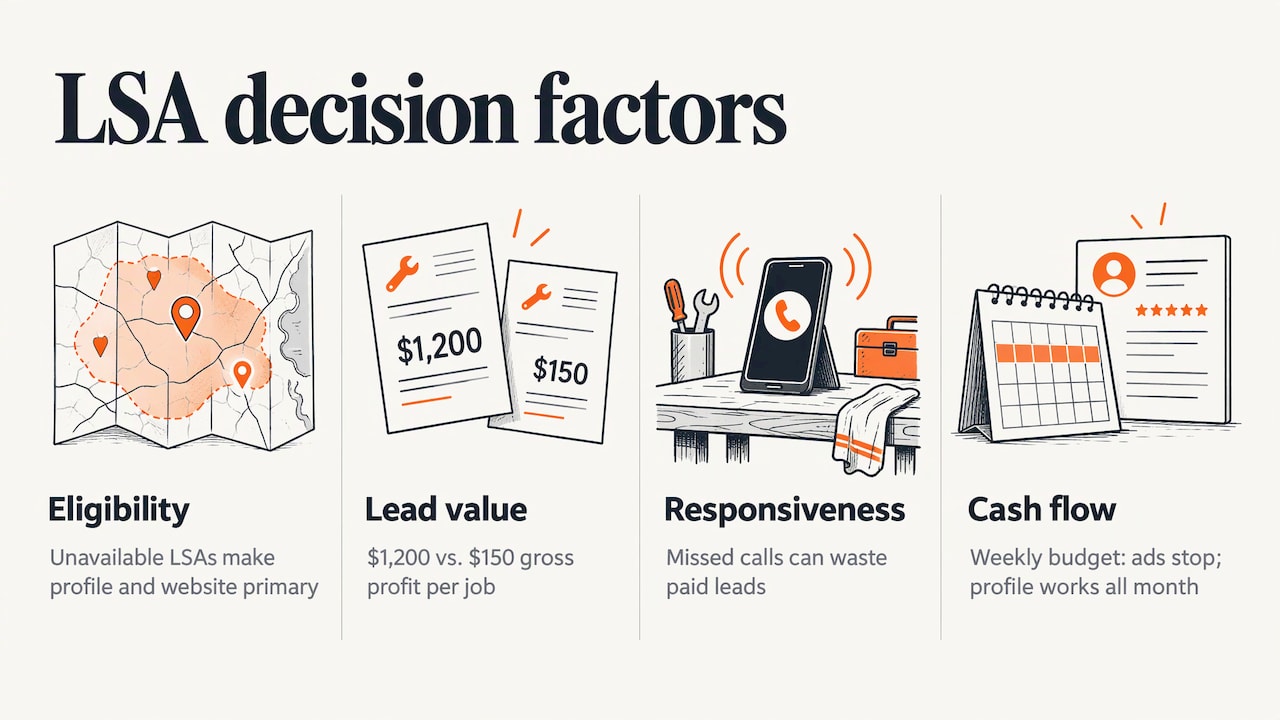
Eligibility. If your business type is not offered in LSAs where you work, the question is settled. Your profile and website become your main route to being found.
Lead value. Start with what a new customer is worth to you. If an average job earns you $1,200 in gross profit, you can afford to pay more for a lead than if it earns $150. Think in terms of cost per paying customer, not cost per lead, because not every inquiry turns into a job.
Responsiveness. You pay when someone contacts you, and Google lists responsiveness as a visibility factor. If you are on a roof or in a crawl space all day and calls go to voicemail, you are paying for leads you may not convert.
Cash flow. A weekly budget means you can start small. It also means ads stop when the budget runs out, while a profile keeps working all month.
For a solo contractor with open capacity and high-value jobs, paid leads can make sense. For a salon, a restaurant, a boutique or a service business with thin margins, a well-managed profile and a fast website usually do more per dollar. Either way, the profile comes first, because the ads lean on it.
A sensible order of operations for a Cincinnati business
Here is the sequence we would follow if you were starting from scratch.
1. Claim and complete your Business Profile
Get the name, address or service area, hours, phone number and categories right. Add real photos. Our first moves for a Google Business Profile walks through the early priorities. Where it goes wrong: inconsistent names, wrong categories and duplicate listings, all of which cause confusion later.
2. Point the profile at a fast website that matches it
Your profile sends people to your site. If the site loads slowly on a phone or does not mirror the details on your listing, visitors leave. Our on-page checks for local businesses list what to fix first.
3. Build reviews steadily
Reviews matter to the profile and are also one of the things Google lists as influencing LSA visibility, with a minimum number required for the paid badge. The easiest way to get them is to ask every happy customer, every time, while the job is fresh.
4. Keep your listings consistent
Your business name, address and phone number should read the same across the web. That is what citations are about. There is more on the broader picture in this local SEO learning resource for owners who want to understand how Google's business tools affect visibility.
5. Then decide on paid leads
With a clean profile, a fast site and a stack of reviews, you can test LSAs from a position of strength. You will also know your own close rate, which tells you what a lead is really worth.
Common mistakes owners make
- Treating the badge as a ranking shortcut. A trust badge helps a paid listing look credible. It does not replace a complete profile.
- Searching for the old badge name and landing on outdated advice. Pages written before the Google Verified change may describe a program that Google has replaced.
- Ignoring the profile because ads are running. Some LSA listing information is drawn from the profile, so stale hours or a wrong phone number can follow you into the ad.
- Measuring leads instead of customers. A cheap lead that never answers your callback costs more than it looks.
- Letting reviews pile up unanswered. Replies show prospects that someone is paying attention.
Where we can help
We build hand-coded, mobile-responsive websites for Cincinnati businesses, and our Website plan is $99 a month with no upfront development cost. It includes hosting, SSL, domain, ongoing maintenance and unlimited content updates.
If the profile is the part you do not have time for, our Google Business Profile management sits inside our Local SEO plan at $299 a month, which covers Google Business Profile management, citation building and on-page optimization. Our Google Review Automation plan, $99 a month, sends automated Google review requests so asking for reviews does not depend on anyone remembering. You can see all three on the pricing page, and if your current site is the weak link, our website redesign is also $99 a month.

Most of our offerings run on a 12-month agreement, so you know what you are paying and what you are getting for the year.
Our perspective
Owners come to us asking about badges and ads when the thing standing between them and more calls is usually simpler: a profile that is accurate and active, and a website that loads fast on a phone.
That is why we build the way we do. Our sites are hand-coded, not assembled from themes or page builders, so they are fast and they match what your profile says about you. Hosting, SSL, your domain, maintenance and unlimited content updates are included, which means changing your hours or adding a service does not turn into a billing conversation.
A profile that is managed, a site that is current and reviews that arrive on their own give you a base that works every day, whether or not you ever buy a paid lead. And if you do decide to try Local Services Ads, they will be pulling from a profile you can be proud of.
We are a local provider with no call centers and no outsourced support, so the person you talk to knows your business and your neighborhood.
Yoshua
FAQ
What is the difference between Google Guarantee and Google Business Profile?
A Google Business Profile is a no-charge listing that shows your business details and reviews on Maps and Search. The Google Guarantee was a badge on paid Local Services Ads that came with a money-back guarantee. The ads require a profile, but a profile does not require the ads.
Is Google Guaranteed still available?
Google announced in August 2025 that Google Verified would replace Google Guaranteed, Google Screened, License Verified by Google and the Money Back Guarantee program, starting in October 2025. If you are applying today, expect the Google Verified name and the check details it displays.
Do I need a Google Business Profile to run Local Services Ads?
Yes. Google lists a Business Profile among the requirements for Local Services Ads, along with an eligible business type and location, screening information and a minimum number of reviews. Some listing details in the ad also come from the profile.
How does Google charge for Local Services Ads?
Google charges when a prospect gets in touch by phone, message or appointment booking. You set a weekly budget and a bidding mode, and the price per lead varies by location, job type and bidding mode.
Which should a small Cincinnati business set up first?
The profile, along with a fast website and a steady flow of reviews. It costs nothing in ad fees, it supports every other Google tool and it keeps working month after month. Paid leads are a decision to make once those basics are in place.
Sources
- Get started with Google Business Profile
- Google Verified makes it easier to find trusted local businesses
- How to grow your business with Local Services Ads
- How to build trust online with the Google Guarantee
- Business eligibility and ownership guidelines
- Local SEO, AEO and GEO Academy