
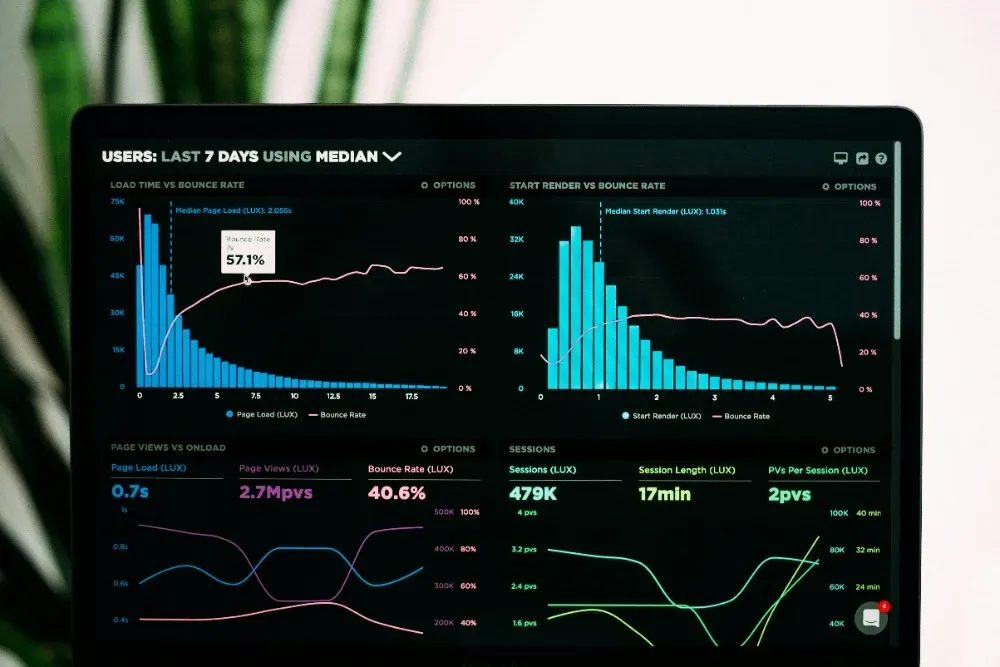
Page Speed and SEO: Why Your Slow Website Is Losing Customers

Page Speed and SEO: Why Your Slow Website Is Losing Customers
Your website might look great, but if it takes more than three seconds to load, you are losing customers before they ever see your content. Page speed is not just a technical metric that developers care about. It is a direct ranking factor that determines whether your business shows up in Google search results and whether visitors stick around long enough to become leads.
For Cincinnati businesses competing for local customers, a slow website is a silent revenue killer. Every second of delay costs you conversions, damages your search visibility, and hands potential customers to faster competitors down the street.
In this guide, we will break down exactly how page speed affects your SEO, what is causing your site to load slowly, and what you can do to fix it today.
How Page Speed Directly Affects SEO Rankings
Google has been clear about this for years: page speed is a ranking factor. But since 2021, it has become even more important through Core Web Vitals, a set of specific metrics Google uses to evaluate user experience on your site.
Core Web Vitals Explained
Google measures three key metrics for every page on your website:
| Metric | What It Measures | Good Score | Poor Score |
|---|---|---|---|
| Largest Contentful Paint (LCP) | How fast the main content loads | Under 2.5 seconds | Over 4 seconds |
| Interaction to Next Paint (INP) | How quickly the page responds to user input | Under 200 milliseconds | Over 500 milliseconds |
| Cumulative Layout Shift (CLS) | How much the page layout shifts during loading | Under 0.1 | Over 0.25 |
These are not abstract scores. They directly influence where your pages rank in search results. A page that loads in 1.5 seconds with stable layout will outrank a competitor's page that takes 5 seconds and shifts around while loading, all else being equal.
If your site is built on a bloated WordPress theme with dozens of plugins, you are likely failing at least one of these metrics. This is one of the key reasons we recommend hand-coded websites over WordPress for businesses that need peak performance.
Google's Speed Signals Beyond Core Web Vitals
Core Web Vitals get the most attention, but Google uses additional speed-related signals:
- Mobile page speed is weighted separately and often more heavily than desktop
- Time to First Byte (TTFB) measures how quickly your server responds
- First Contentful Paint (FCP) tracks when the first content appears on screen
- Total Blocking Time (TBT) measures how long JavaScript blocks the main thread
All of these feed into Google's overall assessment of your site quality. A comprehensive SEO strategy must include page speed optimization as a foundation, not an afterthought.
The Real Impact on Bounce Rates and Conversions
Slow websites do not just rank lower. They actively drive customers away.
The Data on Speed and User Behavior
The numbers paint a clear picture:
- 53% of mobile visitors leave a page that takes longer than 3 seconds to load
- A 1-second delay in page load time reduces conversions by approximately 7%
- Pages loading in 2 seconds have an average bounce rate of 9%, while pages loading in 5 seconds see bounce rates jump to 38%
- 79% of online shoppers who experience a slow site say they will not return
For a Cincinnati service business generating 1,000 website visits per month, a 1-second speed improvement could mean 70 additional leads per month. That is real revenue sitting on the table.
How This Plays Out for Cincinnati Businesses
Consider a plumber in Hyde Park whose website takes 6 seconds to load on mobile. A homeowner with a burst pipe searches "emergency plumber near me" on their phone. Google shows three results. Two load fast, one does not. The homeowner clicks the slow site, waits, gets frustrated, hits back, and calls a competitor. That plumber just lost a $500+ service call because of page speed.
This scenario plays out hundreds of times daily across every industry in Greater Cincinnati. Restaurants in Over-the-Rhine, law firms downtown, contractors in Mason, and dentists in Blue Ash are all vulnerable if their sites lag behind.
Common Causes of Slow Websites
Understanding what slows your site down is the first step toward fixing it. Here are the most frequent culprits we see when auditing Cincinnati business websites.
Unoptimized Images
This is the number one cause of slow websites. A single uncompressed hero image can be 5MB or more, which alone can take several seconds to load on a mobile connection.
Common image problems:
- Using PNG or JPEG when WebP or AVIF would cut file size by 50-80%
- Uploading images at 4000px width when they display at 800px
- Not using lazy loading for below-the-fold images
- Missing responsive image markup (serving desktop images to mobile users)
We built free image optimization tools specifically to help Cincinnati business owners compress and convert their images without needing technical skills. These tools run entirely in your browser, so your images stay private.
Bloated Code and Too Many Plugins
WordPress sites are notorious for this problem. Every plugin adds JavaScript and CSS files that the browser must download and process. A typical WordPress business site with 20-30 plugins loads 40+ separate files before the page renders.
The plugin problem:
- Each plugin adds HTTP requests
- Many plugins load their assets on every page, even where they are not used
- Plugin conflicts create additional processing overhead
- Page builders like Elementor and Divi generate excessively nested HTML
This is why hand-coded websites consistently outperform WordPress on speed benchmarks. A clean, purpose-built codebase loads only what each page needs.
Cheap or Poorly Configured Hosting
Your hosting provider determines your server response time, which is the foundation of your page speed. Bargain shared hosting means your site shares resources with hundreds of other websites on the same server.
Hosting-related speed issues:
- Slow Time to First Byte (TTFB) from overloaded servers
- No server-side caching
- Data centers located far from your visitors
- Limited bandwidth during traffic spikes
Choosing the right hosting is critical for both speed and reliability. Our guide on Cincinnati web hosting covers how to evaluate hosting providers and what to look for.
Render-Blocking Resources
When a browser encounters JavaScript or CSS files in the page header, it stops rendering the page until those files download and execute. This is called render-blocking, and it directly inflates your LCP and FCP scores.
Common render-blocking issues:
- Third-party scripts (analytics, chat widgets, social media embeds) loading synchronously
- Large CSS frameworks loaded in their entirety when only a small portion is used
- JavaScript files that could be deferred or loaded asynchronously
No Caching Strategy
Without proper caching, browsers re-download every file on every visit. This wastes bandwidth, increases server load, and makes repeat visits unnecessarily slow.
How to Test Your Website Speed
Before you can fix speed issues, you need to measure them. Here are the tools we recommend.
Free Speed Testing Tools
| Tool | Best For | URL |
|---|---|---|
| Google PageSpeed Insights | Core Web Vitals + actionable recommendations | pagespeed.web.dev |
| GTmetrix | Waterfall analysis showing exactly what loads and when | gtmetrix.com |
| WebPageTest | Advanced testing with multiple locations and devices | webpagetest.org |
| Google Search Console | Real-world Core Web Vitals data from actual visitors | search.google.com/search-console |
What to Look For in Your Results
When you run a speed test, focus on these areas:
- LCP score: Is it under 2.5 seconds? If not, your largest content element (usually a hero image or heading) is loading too slowly.
- Total page size: Anything over 3MB on a standard page is bloated.
- Number of requests: More than 50 HTTP requests per page suggests too many resources.
- Render-blocking resources: The test will flag scripts and stylesheets that delay rendering.
- Image optimization: Look for images that can be compressed or converted to modern formats.
Run tests on both desktop and mobile. Mobile results matter more for SEO since Google uses mobile-first indexing.
Actionable Speed Improvements You Can Make Today
Here are concrete steps to improve your page speed, ordered from easiest to most complex.
Quick Wins (No Developer Needed)
- Compress your images. Use our free image optimization tools to convert images to WebP format and reduce file sizes by 50-80%.
- Remove unused plugins. Audit your WordPress plugins and deactivate anything you do not actively use.
- Enable browser caching. Most hosting control panels have a caching option. Turn it on.
- Reduce embedded videos. Replace auto-playing video backgrounds with static images or load videos on click.
Intermediate Fixes
- Implement lazy loading for images and videos below the fold
- Minify CSS and JavaScript files to remove unnecessary whitespace and comments
- Use a CDN (Content Delivery Network) to serve files from servers closer to your visitors
- Optimize your fonts by using system fonts or limiting custom font weights to what you actually use
Advanced Optimizations
- Eliminate render-blocking resources by deferring non-critical JavaScript and inlining critical CSS
- Implement responsive images with srcset attributes to serve appropriately sized images per device
- Switch to a faster hosting provider with server-side caching and modern infrastructure
- Consider a hand-coded rebuild if your current platform cannot be optimized further
If your website is built on an outdated platform or a heavy page builder, optimizing within that system has limits. At some point, the most cost-effective solution is a clean rebuild with performance baked in from the start. Our web design services focus on building sites that score 90+ on PageSpeed Insights out of the box.
Why Mobile Speed Matters Even More
Over 60% of Google searches happen on mobile devices, and for local searches like "restaurant near me" or "plumber Cincinnati," that number is even higher. Google uses mobile-first indexing, which means the mobile version of your site is what Google evaluates for rankings.
Mobile-Specific Speed Challenges
Mobile visitors face additional speed hurdles:
- Slower connections: Many users are on 4G or spotty WiFi, not gigabit fiber
- Less processing power: Mobile devices handle JavaScript more slowly than desktops
- Smaller screens: Layout shifts are more disruptive on small screens
- Impatient users: Mobile searchers are often on the go and will not wait
A site that loads in 2 seconds on your office desktop might take 6+ seconds on a customer's phone at a Cincinnati Reds game or sitting in I-75 traffic. Test your site on real mobile devices and throttled connections to get an accurate picture.
The Local Search Connection
For Cincinnati businesses, mobile speed and local search are deeply intertwined. When someone searches "best pizza in Oakley" on their phone, Google factors in page speed when deciding which results to show. A fast-loading restaurant site with good reviews will consistently outrank a slow competitor, even if the slow site has been around longer.
Regular website maintenance keeps your site speed optimized over time as content changes, new images get uploaded, and browser standards evolve.
Cincinnati Businesses Are Losing Customers to Faster Competitors
The competitive landscape in Greater Cincinnati is tightening. More businesses invest in professional websites every year, and the ones that prioritize speed are pulling ahead.
If your competitor's site loads in 1.5 seconds and yours takes 5 seconds, you are at a disadvantage in three ways:
- Search rankings: Google rewards their fast site with higher placement
- User experience: Visitors prefer their site and stay longer
- Conversions: Their visitors complete contact forms and make calls while yours bounce
This is not hypothetical. We see it in our portfolio and in the analytics of every client we work with. Speed improvements consistently correlate with higher rankings, more traffic, and more leads.
Frequently Asked Questions
How does page speed affect SEO rankings?
Page speed is a direct Google ranking factor through Core Web Vitals. Google measures Largest Contentful Paint (LCP), Interaction to Next Paint (INP), and Cumulative Layout Shift (CLS) to evaluate user experience. Sites that fail these metrics are penalized in search rankings, while fast sites earn a ranking boost. Slow pages also increase bounce rates, which indirectly signals poor quality to search engines.
What is a good page load time for a website?
Google recommends a Largest Contentful Paint (LCP) under 2.5 seconds for a good user experience. Ideally, your pages should fully load in under 3 seconds on both desktop and mobile. Pages that take longer than 3 seconds to load lose approximately 53% of mobile visitors. For local businesses competing in Cincinnati, faster load times give you a measurable edge over slower competitors.
What are the most common causes of a slow website?
The most common causes include unoptimized images (large file sizes, wrong formats), bloated code from page builders and excessive plugins, cheap shared hosting with slow server response times, render-blocking JavaScript and CSS, no browser caching, and missing content delivery network (CDN) configuration. WordPress sites with 20+ plugins are especially prone to speed issues.
Can I fix my website speed myself or do I need a professional?
Some speed improvements are DIY-friendly, like compressing images using our free tools, removing unused plugins, and enabling browser caching. However, deeper fixes like code optimization, server configuration, render-blocking resource management, and Core Web Vitals tuning typically require professional help. A web developer can audit your site, identify the biggest bottlenecks, and implement fixes that deliver measurable speed gains.
Related Reading
The Complete Guide to Web Design in Cincinnati. Everything local businesses need to know about professional web design, including costs, timelines, and what makes a great site.
Cincinnati Web Hosting: How to Choose the Right Provider. Compare hosting options and learn how your hosting choice directly affects page speed and SEO.
Hand-Coded Websites vs. WordPress: What's the Difference?. Understand why hand-coded sites consistently outperform WordPress on speed and Core Web Vitals.
Ready to Speed Up Your Website?
A slow website costs you customers every day. Whether you need a speed audit, performance optimization, or a complete rebuild on a faster platform, we can help.
- Website Maintenance Plans. Ongoing speed monitoring and optimization
- SEO and Growth Plans. Page speed optimization as part of a complete SEO strategy
- Professional Web Design. Fast-loading sites built right from the ground up
Get a Free Speed Consultation →
We serve businesses throughout Greater Cincinnati including Mason, Blue Ash, Norwood, Fairfield, Loveland, Covington, Florence, Newport, and beyond.