

An XML sitemap is a file that lists the pages on your website you want Google to find. Google describes a sitemap as a file that tells search engines about a site's pages, videos and other files, and the relationships between them. For a local business, the useful part is simple: when your site changes, the sitemap should change with it, and Google should know where to find it. We build and maintain sites for Cincinnati businesses, so this guide covers what the file contains, whether you need one, how to submit it and what to do when something goes wrong.
TL;DR
- An XML sitemap is a machine-readable list of your important URLs, with optional details such as the last-modified date. It is written for search engines, not visitors.
- Google says a small site of about 500 pages or fewer, with good internal links, may not strictly need one. A sitemap is still cheap insurance for a new site with few links pointing at it.
- Check whether your site already makes a sitemap, then submit its URL in the Sitemaps report in Google Search Console.
- A sitemap never guarantees crawling or indexing. It helps discovery; page quality and internal links do the rest.
- A sitemap goes stale when pages are added, removed or renamed. Keeping it current is a maintenance job, not a one-time task.
Table of Contents
- What an XML sitemap actually is
- Do you need a sitemap?
- What belongs in the sitemap, and what does not
- How to find your sitemap in two minutes
- How to submit your sitemap to Google
- What to do when Search Console reports an error
- XML sitemap vs. HTML sitemap
- Why a sitemap goes stale, and why that matters
- Where a sitemap fits in local search
- Our perspective
- A website that stays current for $99 a month
- FAQ
- Sources
What an XML sitemap actually is
Think of your website as a building and Google's crawler as a visitor with no floor plan. The crawler can walk the hallways (your internal links), but a floor plan tells it which rooms exist and which ones matter. That floor plan is the sitemap.
XML is just a plain-text format with tags around each item. You do not need to read code to use one. A sitemap entry is basically a web address, plus optional extras. Per Google, a sitemap can identify important URLs, last-modified dates and alternate language versions. Extensions can add details for images, video and news content. A video entry, for example, can give running time and rating, and a news entry can include the article title and publication date.
Two more points keep expectations realistic:
- A sitemap is a list, not a ranking boost. Search Engine Land's November 2025 guide on XML sitemaps describes the file as a crawler-facing list of URLs that complements internal linking rather than replacing it.
- Your visitors never see it. That separates it from an HTML sitemap, covered below.
Do you need a sitemap?
Google's own answer is nuanced. A sitemap helps most on large or complex sites, on new sites with few external links, and on sites with rich media or Google News content. Google also says a small site of about 500 pages or fewer, with comprehensive internal links and little media or news content, may not need one.
Most local business sites fall under that 500-page line. So why bother? Four reasons:
- A new site has few links pointing to it. Crawlers find sites by following links. A brand-new plumbing, dental or landscaping site has almost none, so a sitemap gives Google a direct list of what exists.
- Internal linking is rarely perfect. A service page buried three clicks deep, or a page nobody linked to after a redesign, can be missed. The sitemap is a second route to it.
- It is a low-effort file. If your platform produces one automatically, you lose nothing by submitting it.
- It gives you a report. Submitting it in Search Console shows you whether Google can read it and flags errors you would not otherwise see.
The honest limit: Google states that a sitemap does not guarantee crawling or indexing. If a page is thin, duplicated or blocked, listing it will not fix that.
What belongs in the sitemap, and what does not
The sitemap should be a clean list of the pages you want people to find in search. For a Cincinnati service business that usually means:
- Your home page
- Each service page, such as drain cleaning, roof repair or tax preparation
- Location or neighborhood pages, if you have them
- About and contact pages
- Blog posts and guides worth ranking
Leave out anything that should not show up in search: thank-you pages, login screens, internal search results, test pages and duplicate versions of the same page. Digital.gov's introduction to XML sitemaps advises excluding pages that should not appear in search. Google's build guide adds that URLs should be canonical, meaning the one preferred address for each page, and absolute, meaning the full address starting with https:// rather than a partial path.
If your pages are well built, your service pages are the ones that earn calls. Our guide to building service pages that rank and convert covers what each one should contain, and the sitemap is how you make sure each one is discoverable.
How to find your sitemap in two minutes
Before you build anything, look for one that already exists. Google's guide says most content management systems, including WordPress, Wix and Blogger, likely already make a sitemap available.
Try these steps:
- Type your domain followed by /sitemap.xml into the browser address bar. For example: yourbusiness.com/sitemap.xml.
- If that shows an error, try /sitemap_index.xml, which some platforms use when the sitemap is split into several files.
- Open your site's robots.txt file at yourbusiness.com/robots.txt. A robots.txt file is a small text file that gives crawlers instructions, and it often includes a line pointing to the sitemap.
- If you see a list of your page addresses, you have a sitemap.
If you still find nothing, you need one created. Google recommends creating it by hand when a site has fewer than a few dozen URLs and generating it automatically for larger sites. Search Engine Land's guide to XML sitemaps and SEO advises WordPress users to rely on a sitemap-generating SEO plugin, and other sites to work with a developer on a dynamic sitemap.
What a valid file looks like
Whoever produces the file, these technical rules from Google's build and submit guide apply:
- Use UTF-8 encoding, a standard text format that handles all characters.
- Escape special characters in URLs, such as ampersands, following XML rules.
- Keep each file under 50 MB uncompressed and 50,000 URLs. Larger sites split the list into several files.
- Use full, canonical URLs.
Digital.gov adds two placement tips: put the sitemap at the root of your domain and point to it from robots.txt. A sitemap at the root can cover the whole site, which is why /sitemap.xml is the convention.
Sites with thousands of pages have an extra problem: the list has to be rebuilt as content changes. This walkthrough of dynamic sitemaps for large sites explains how developers keep a 50,000-URL file from going stale. A typical local business site is far smaller, but the principle is the same: the file should follow the site, not the other way around.
How to submit your sitemap to Google
Submitting tells Google exactly where your sitemap lives. Here is the process, based on Google's Sitemaps report documentation.
- Set up Google Search Console. It is Google's free tool for seeing how your site performs in search. You need owner permissions on the property to submit a sitemap, so whoever manages your domain must verify it first.
- Post the sitemap on your site. It must load at a public web address.
- Test access. Google recommends using the live URL inspection tool to confirm Googlebot can reach the file. The page fetch result should read Successful.
- Open the Sitemaps report. In Search Console, choose Sitemaps in the left menu.
- Enter the sitemap URL and submit. Type only the part after your domain, such as sitemap.xml, and press Submit.
- Read the status. The report shows submission status, whether Googlebot could access the file and any processing errors.
Google says it usually fetches the file right away. Crawling the URLs listed inside can take longer, and it is never guaranteed. Do not expect every page to appear in search the same day.
You only need to submit once. Google rechecks a known sitemap on its own, so there is no need to resubmit after every small edit.
Point to it from robots.txt too
Adding a Sitemap line to your robots.txt file lets any crawler find the file without Search Console. Digital.gov lists this alongside root placement as a basic habit. The two methods work together: Search Console gives you reporting, and robots.txt gives every search engine a pointer.
What to do when Search Console reports an error
Open the sitemap's row in the Sitemaps report and read the error details. Google's documentation points to a short checklist:
- Is the file at a usable URL? Open the address yourself. A typo or a moved file is the most common cause.
- Is the format accepted? Check that it is a valid XML sitemap, not a web page dressed up as one.
- Can Googlebot reach it? A password prompt, a login wall or a block in your settings stops the crawler.
- Does it pass syntax validation? An unescaped character or a missing closing tag can invalidate the file.
Fix the problem, then resubmit. Google says it retries a failed fetch for a few days, then stops if the file stays unavailable or keeps showing critical errors. That is why a sitemap error should be handled within days, not months.
XML sitemap vs. HTML sitemap
The two share a name and little else. An XML sitemap is for search engines. An HTML sitemap is a regular page of links for people, often linked in the footer. Search Engine Journal's October 2026 report on how Google treats HTML sitemaps explains that Google can crawl the links on an HTML sitemap like any other links, but cannot submit or process it as an XML sitemap.
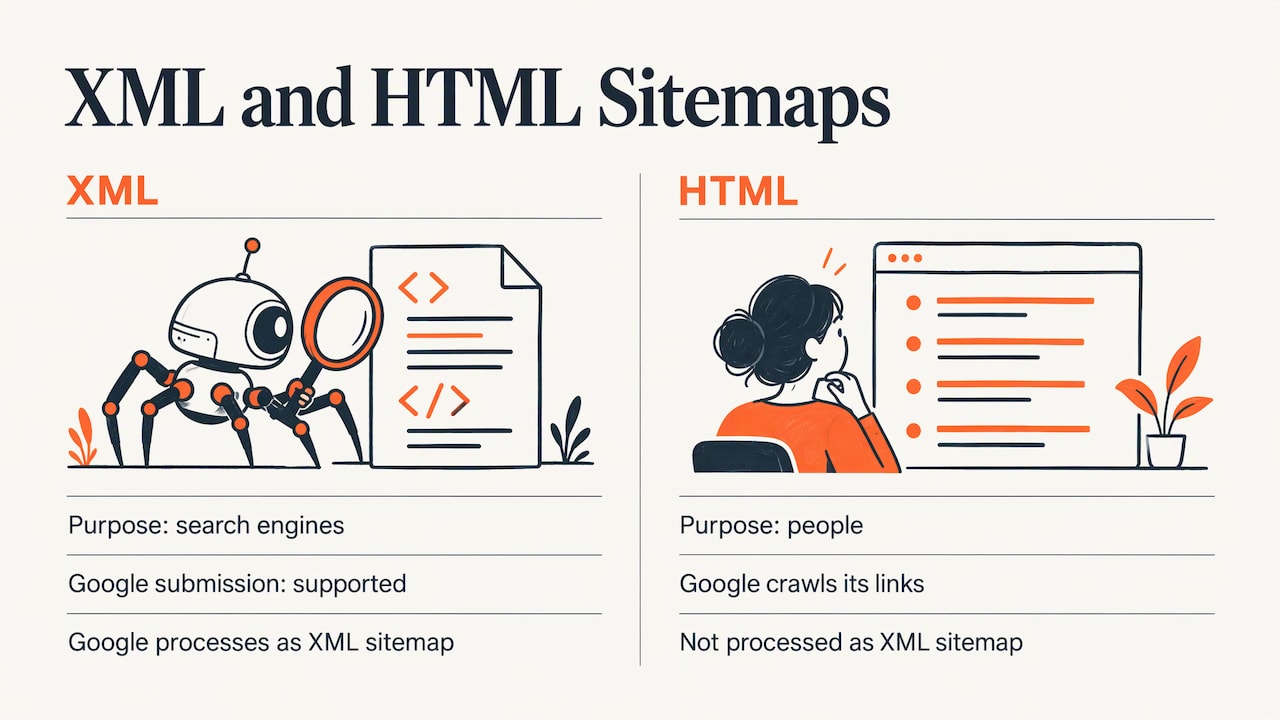
So for submission to Google, you need the XML version. An HTML sitemap is optional and mostly helps visitors who are lost on a larger site.
Why a sitemap goes stale, and why that matters
A sitemap is easy to create and easy to forget. Then a few things happen:
- You add a new service page, and it is missing from the list.
- You delete an old page, and the sitemap still lists a URL that now shows an error.
- You redesign the site and every address changes, leaving the old sitemap pointing at nothing.
- You switch to a new domain or move to https, and the file still shows the old addresses.
Each of these sends Google mixed signals. The fix is a process: whenever a page is added, removed or renamed, the sitemap is checked as part of the same change. For a busy owner, that is exactly the kind of small job that slips.
That is also why the sitemap belongs in a website maintenance plan rather than on a one-time checklist. It sits alongside the other tasks that keep a site healthy over time.
Where a sitemap fits in local search
For a Cincinnati business, getting found takes several pieces working together, and the sitemap handles only one: discovery of your pages. The others are:
- Content that answers the search. Each service and area page needs real substance.
- Structured data. Our guide on local schema markup explains what to add so search engines understand your business details.
- Citations. Consistent listings across the web, covered in our piece on local SEO citations.
- Measurement. Our local SEO reporting guide shows what to track once pages are indexed.
A sitemap makes sure Google knows the pages exist. Everything else decides whether those pages deserve to show up.
Our perspective
We hand-code every site we build. There are no themes and no page builders, so we know what is on every page and what should be listed for search engines. That is a good starting point for a clean sitemap: nothing is hidden behind a plugin you have never heard of.
The mistake we see owners worry about most is not the file itself. It is the gap between the site as it is today and the site as search engines were last told about it. A site that gets new pages, new prices and new services every few months needs someone paying attention.
That is why we think of a website as an ongoing service, not a one-time project. Our Website plan is $99 a month with no upfront development cost, and it includes hosting, SSL, your domain, maintenance and unlimited content updates. When you add a page or change something, you ask us, and you are talking to a local person, not a call center.
If you want your pages found by people in Cincinnati, a sitemap is one small part of a bigger job. Fast pages, mobile-friendly layouts, a well-managed Google Business Profile and steady reviews do the heavy lifting. The sitemap just makes sure the door is easy to find.
Yoshua
A website that stays current for $99 a month
If your site is slow to update, or a past developer charged you for every change, the sitemap is a symptom of a larger problem. Our Website plan is $99 per month, with no upfront cost. It covers hosting, SSL, a domain, ongoing maintenance and unlimited content updates, on a hand-coded, mobile-responsive site made for Cincinnati businesses.
If you already have a site that no longer does its job, our website redesign service is also $99 per month. If you want help being found in local results, our Local SEO plan is $299 per month and includes Google Business Profile management, citation building and on-page optimization.

You can see the full details on our pricing page, or read more about how we build sites without WordPress.
FAQ
What is an XML sitemap in simple terms?
It is a file listing the pages on your website that you want search engines to find. It is written in XML, a plain-text format machines read easily. Visitors never see it, but Google can use it to discover your pages and check details like when they were last changed.
Do I need a sitemap for a small business website?
Not always. Google says a site of about 500 pages or fewer with strong internal links may not need one. That said, a new site with few links pointing to it benefits from one, and submitting a sitemap gives you error reporting in Search Console.
How do I submit a sitemap to Google?
Verify your site in Google Search Console, open the Sitemaps report, type your sitemap's address and press Submit. You need owner permissions. Google usually fetches the file right away, though crawling the listed pages can take longer.
Will a sitemap make my site rank higher?
No. A sitemap helps Google discover pages, but it does not guarantee crawling or indexing, and it is not a ranking factor on its own. Page quality, internal links and local signals decide how your pages perform.
Sources
- What Is a Sitemap | Google Search Central
- Build and Submit a Sitemap | Google Search Central
- Sitemaps report | Search Console Help
- An introduction to XML sitemaps | Digital.gov
- XML Sitemaps: What They Are & Why They Matter for SEO | Search Engine Land
- XML sitemaps and SEO: What you need to know | Search Engine Land
- Google Explains How To Use HTML Sitemaps For SEO | Search Engine Journal
- Stop Stale Sitemaps: Dynamic Sitemaps for SEO Developers